SF OAuth Flows Arcade
by Sheshant Kashyap
This is a Node.js application with as sole purpose to practice and understand the different OAuth flows for authorization on the Salesforce platform.
This application is completely built on top of Nicolas Vanden Bossche's work.

-
The user is redirected with an HTTP GET to the Salesforce Authorization Endpoint at
https://crmarcade-dev-ed.develop.my.salesforce.com/services/oauth2/authorizewith the following parameters:-
response_type=token -
client_id=3MVG9PwZx9R6_Urdy2QSE9vUS0bGInIVgkA8QDhx.bo98bY9LJQKZbqO_lMTXB4.CK1MvTAXIca5Sca742cB2- should match the client ID in the Connected App -
redirect_uri=https://crmarcade-a5c46f951f3a.herokuapp.com/services/oauth2/success- should match the callback URL in the Connected App -
state=<generated_on_click> -
nonce=<generated_on_click>
-
- Salesforce requests the user to log in and authorize the Connected App for the selected OAuth scopes. If the credentials are incorrect or the user declines the authorization, the flow fails. Otherwise it continues to the next step.
-
Salesforce validates the GET request. Successful validation results in a positive response
and failed validation in a negative response, which is returned by Salesforce calling the callback URL.
The following parameters are validated:
- Authorization code
- Code verifier
- Client id
- Client secret
- Redirect uri - if it matches with the redirect_uri specified in the Connected App
-
After successful authorization, Salesforce redirects to the callback URL. There are
different parameters returned in the URL:
-
token_type=Bearer -
instance_url=https://crmarcade-dev-ed.develop.my.salesforce.com -
access_token=<returned_by_Salesforce> -
refresh_token=<returned_by_Salesforce> -
state=<returned_by_Salesforce>- Same state as specified in the request. -
scope=<returned_by_Salesforce>- Same scope as specified in the request, or all scopes from the Connected App if not specified.
-
-
The
access_tokenfrom the response is used to query the Salesforce APIs.
-
A malicious app tries to access resources they are not allowed to. This is blocked by the
scope parameter of the Connected App. For example, even if the user has the permission to
post on chatter through its permissions, the malicious app will not be able to post on
chatter if the
chatter_apiscope wasn't enabled for the Connected App. - A malicious app tries to send a user-agent request on behalf of the actual app (Cross-Site Request Forging or CSRF). This is blocked by the state parameter where the actual app sends a unique identifier for every user-agent request. Only if the actual app sees the same state being returned on the callback URL endpoint, it will know that the original request was originated from its context.
- A malicious, but seemingly harmless app is installed on your phone. It comes with an embedded browser inside the app which is used to launch the User-Agent flow. However, the embedded browser actually captures username and password while typing. This is something very difficult to block and requires educating the user to not type credentials in an embedded browser unless you really trust the app. It's better to work with a Web-Server flow without client secret or assertion where a trusted mobile browser is used for launching the auth flow (see lower).
-
Attackers could leverage the browser history to obtain the access token since it's
returned in plain text in the URL. This is avoided by adding the callback parameters
as part of the fragment
identifier. This makes it impossible to retrieve the access token by using methods
such as
window.history()in JavaScript.
Web Server Flow with Client Secret and PKCE (OAuth 2.0)

-
The user is redirected with an HTTP GET to the Salesforce Authorization Endpoint at
https://crmarcade-dev-ed.develop.my.salesforce.com/services/oauth2/authorizewith the following parameters:-
response_type=code -
client_id=3MVG9PwZx9R6_Urdy2QSE9vUS0bGInIVgkA8QDhx.bo98bY9LJQKZbqO_lMTXB4.CK1MvTAXIca5Sca742cB2- should match the client ID in the Connected App -
redirect_uri=https://crmarcade-a5c46f951f3a.herokuapp.com/services/oauth2/success- should match the callback URL in the Connected App -
code_challenge=<generated_on_click> -
state=<generated_on_click>
-
- Salesforce requests the user to log in and authorize the Connected App for the selected OAuth scopes. If the credentials are incorrect or the user declines the authorization, the flow fails. Otherwise it continues to the next step.
-
Salesforce validates the GET request. Successful validation results in a positive response
and failed validation in a negative response, which is returned by Salesforce calling the callback URL.
The following parameters are validated:
- Authorization code
- Code verifier
- Client id
- Client secret
- Redirect uri - if it matches with the redirect_uri specified in the Connected App
-
After successful authorization, Salesforce redirects to the callback URL. There are
different parameters returned in the URL:
-
code=<returned_by_Salesforce>- the authorization code. -
state=<returned_by_Salesforce>- Same state as specified in the request.
-
-
The application server launches an HTTP POST request to the Salesforce
Token Endpoint at
https://crmarcade-dev-ed.develop.my.salesforce.com/services/oauth2/tokenwith the following parameters:-
grant_type=authorization_code -
client_id=3MVG9PwZx9R6_Urdy2QSE9vUS0bGInIVgkA8QDhx.bo98bY9LJQKZbqO_lMTXB4.CK1MvTAXIca5Sca742cB2- should match the client ID in the Connected App -
client_secret=69B6478DECEE6FA8D6CB04DD37DD32051BB5D90199C03FC497D50F93422DE49A- should match the client secret in the Connected App -
redirect_uri=https://crmarcade-a5c46f951f3a.herokuapp.com/services/oauth2/success- should match the callback URL in the Connected App -
code=<returned_by_Salesforce>
-
-
Salesforce validates the POST request. Successful validation results in a positive response
and failed validation in a negative response. The following parameters are validated:
- Authorization code
- Code verifier
- Client id
- Client secret
- Redirect uri - if it matches with the redirect_uri specified in the Connected App
-
After a successful validation, Salesforce returns a response to the HTTP POST message
containing the following values:
-
token_type=Bearer -
instance_url=https://crmarcade-dev-ed.develop.my.salesforce.com -
access_token=<returned_by_Salesforce> -
refresh_token=<returned_by_Salesforce>
-
-
The
access_tokenfrom the response is used to query the Salesforce APIs.
-
A malicious app tries to access resources they are not allowed to. This is blocked by the
scope parameter of the Connected App. For example, even if the user has the permission to
post on chatter through its permissions, the malicious app will not be able to post on
chatter if the
chatter_apiscope wasn't enabled for the Connected App. - A malicious app tries to send a user-agent request on behalf of the actual app (Cross-Site Request Forging or CSRF). This is blocked by the state parameter where the actual app sends a unique identifier for every user-agent request. Only if the actual app sees the same state being returned on the callback URL endpoint, it will know that the original request was originated from its context.
- A malicious app pretends it's our server. This is blocked because only our server should have access to the client secret. That's why it's so important that the client secret can be well-guarded by the server.
- A malicious app intercepts the authorization code and tries to use it to get an access token. This is blocked by using the code_challenge parameter in the authorization request, which is then checked against the code_verifier parameter in the token request. The code verifier is 128 bytes of random data with high entropy that's base64url encoded. The code challenge is the base64url encoded SHA256 hash value of the code verifier.
Web Server Flow with Client Assertion and PKCE (OAuth 2.0)
-
The user is redirected with an HTTP GET to the Salesforce Authorization Endpoint at
https://crmarcade-dev-ed.develop.my.salesforce.com/services/oauth2/authorizewith the following parameters:-
response_type=code -
client_id=3MVG9PwZx9R6_Urdy2QSE9vUS0bGInIVgkA8QDhx.bo98bY9LJQKZbqO_lMTXB4.CK1MvTAXIca5Sca742cB2- should match the client ID in the Connected App -
redirect_uri=https://crmarcade-a5c46f951f3a.herokuapp.com/services/oauth2/success- should match the callback URL in the Connected App -
code_challenge=<generated_on_click> -
state=<generated_on_click>
-
- Salesforce requests the user to log in and authorize the Connected App for the selected OAuth scopes. If the credentials are incorrect or the user declines the authorization, the flow fails. Otherwise it continues to the next step.
-
Salesforce validates the GET request. Successful validation results in a positive response
and failed validation in a negative response, which is returned by Salesforce calling the callback URL.
The following parameters are validated:
- Authorization code
- Code verifier
- Client id
- Client secret
- Redirect uri - if it matches with the redirect_uri specified in the Connected App
-
After successful authorization, Salesforce redirects to the callback URL. There are
different parameters returned in the URL:
-
code=<returned_by_Salesforce>- the authorization code. -
state=<returned_by_Salesforce>- Same state as specified in the request.
-
-
The application server launches an HTTP POST request to the Salesforce
Token Endpoint at
https://crmarcade-dev-ed.develop.my.salesforce.com/services/oauth2/tokenwith the following parameters:-
grant_type=authorization_code -
client_id=3MVG9PwZx9R6_Urdy2QSE9vUS0bGInIVgkA8QDhx.bo98bY9LJQKZbqO_lMTXB4.CK1MvTAXIca5Sca742cB2- should match the client ID in the Connected App -
redirect_uri=https://crmarcade-a5c46f951f3a.herokuapp.com/services/oauth2/success- should match the callback URL in the Connected App -
client_assertion_type=urn:ietf:params:oauth:client-assertion-type:jwt-bearer -
client_assertion=<generated_on_click> -
code=<returned_by_Salesforce>
-
-
Salesforce validates the POST request. Successful validation results in a positive response
and failed validation in a negative response. The following parameters are validated:
- Authorization code
- Code verifier
- Client id
- Client secret
- Redirect uri - if it matches with the redirect_uri specified in the Connected App
-
After a successful validation, Salesforce returns a response to the HTTP POST message
containing the following values:
-
token_type=Bearer -
instance_url=https://crmarcade-dev-ed.develop.my.salesforce.com -
access_token=<returned_by_Salesforce> -
refresh_token=<returned_by_Salesforce>
-
-
The
access_tokenfrom the response is used to query the Salesforce APIs.
-
A malicious app tries to access resources they are not allowed to. This is blocked by the
scope parameter of the Connected App. For example, even if the user has the permission to
post on chatter through its permissions, the malicious app will not be able to post on
chatter if the
chatter_apiscope wasn't enabled for the Connected App. - A malicious app tries to send a user-agent request on behalf of the actual app (Cross-Site Request Forging or CSRF). This is blocked by the state parameter where the actual app sends a unique identifier for every user-agent request. Only if the actual app sees the same state being returned on the callback URL endpoint, it will know that the original request was originated from its context.
- A malicious app pretends it's our server. This is blocked because only our server should have access to the private key that is used to sign the assertion. That's why it's so important that private keys are never shared with any system.
- A malicious app intercepts the authorization code and tries to use it to get an access token. This is blocked by using the code_challenge parameter in the authorization request, which is then checked against the code_verifier parameter in the token request. The code verifier is 128 bytes of random data with high entropy that's base64url encoded. The code challenge is the base64url encoded SHA256 hash value of the code verifier.
Web Server Flow with PKCE Only (OAuth 2.0)
Make sure to uncheck the "Require Secret for Web Server Flow" flag in the Connected App. Ideal alternative to user agent for mobile flows.

-
The user is redirected with an HTTP GET to the Salesforce Authorization Endpoint at
https://crmarcade-dev-ed.develop.my.salesforce.com/services/oauth2/authorizewith the following parameters:-
response_type=code -
client_id=3MVG9PwZx9R6_Urdy2QSE9vUS0bGInIVgkA8QDhx.bo98bY9LJQKZbqO_lMTXB4.CK1MvTAXIca5Sca742cB2- should match the client ID in the Connected App -
redirect_uri=https://crmarcade-a5c46f951f3a.herokuapp.com/services/oauth2/success- should match the callback URL in the Connected App -
code_challenge=<generated_on_click> -
state=<generated_on_click>
-
- Salesforce requests the user to log in and authorize the Connected App for the selected OAuth scopes. If the credentials are incorrect or the user declines the authorization, the flow fails. Otherwise it continues to the next step.
-
Salesforce validates the GET request. Successful validation results in a positive response
and failed validation in a negative response, which is returned by Salesforce calling the callback URL.
The following parameters are validated:
- Authorization code
- Code verifier
- Client id
- Client secret
- Redirect uri - if it matches with the redirect_uri specified in the Connected App
-
After successful authorization, Salesforce redirects to the callback URL. There are
different parameters returned in the URL:
-
code=<returned_by_Salesforce>- the authorization code. -
state=<returned_by_Salesforce>- Same state as specified in the request.
-
-
The application server launches an HTTP POST request to the Salesforce
Token Endpoint at
https://crmarcade-dev-ed.develop.my.salesforce.com/services/oauth2/tokenwith the following parameters:-
grant_type=authorization_code -
client_id=3MVG9PwZx9R6_Urdy2QSE9vUS0bGInIVgkA8QDhx.bo98bY9LJQKZbqO_lMTXB4.CK1MvTAXIca5Sca742cB2- should match the client ID in the Connected App -
redirect_uri=https://crmarcade-a5c46f951f3a.herokuapp.com/services/oauth2/success- should match the callback URL in the Connected App -
code=<returned_by_Salesforce>
-
-
Salesforce validates the POST request. Successful validation results in a positive response
and failed validation in a negative response. The following parameters are validated:
- Authorization code
- Code verifier
- Client id
- Client secret
- Redirect uri - if it matches with the redirect_uri specified in the Connected App
-
After a successful validation, Salesforce returns a response to the HTTP POST message
containing the following values:
-
token_type=Bearer -
instance_url=https://crmarcade-dev-ed.develop.my.salesforce.com -
access_token=<returned_by_Salesforce> -
refresh_token=<returned_by_Salesforce>
-
-
The
access_tokenfrom the response is used to query the Salesforce APIs.
-
A malicious app tries to access resources they are not allowed to. This is blocked by the
scope parameter of the Connected App. For example, even if the user has the permission to
post on chatter through its permissions, the malicious app will not be able to post on
chatter if the
chatter_apiscope wasn't enabled for the Connected App. - A malicious app tries to send a user-agent request on behalf of the actual app (Cross-Site Request Forging or CSRF). This is blocked by the state parameter where the actual app sends a unique identifier for every user-agent request. Only if the actual app sees the same state being returned on the callback URL endpoint, it will know that the original request was originated from its context.
- This flow authenticates the client based on the callback URL, just like User Agent flow. Unlike the User Agent flow, it leverages a mobile browser that is not embedded, which provides additional security to the mobile app user because the mobile app itself doesn't need to be trusted fully with credentials.
- A malicious app intercepts the authorization code and tries to use it to get an access token. This is blocked by using the code_challenge parameter in the authorization request, which is then checked against the code_verifier parameter in the token request. The code verifier is 128 bytes of random data with high entropy that's base64url encoded. The code challenge is the base64url encoded SHA256 hash value of the code verifier.
Refresh Token Flow (OAuth 2.0)
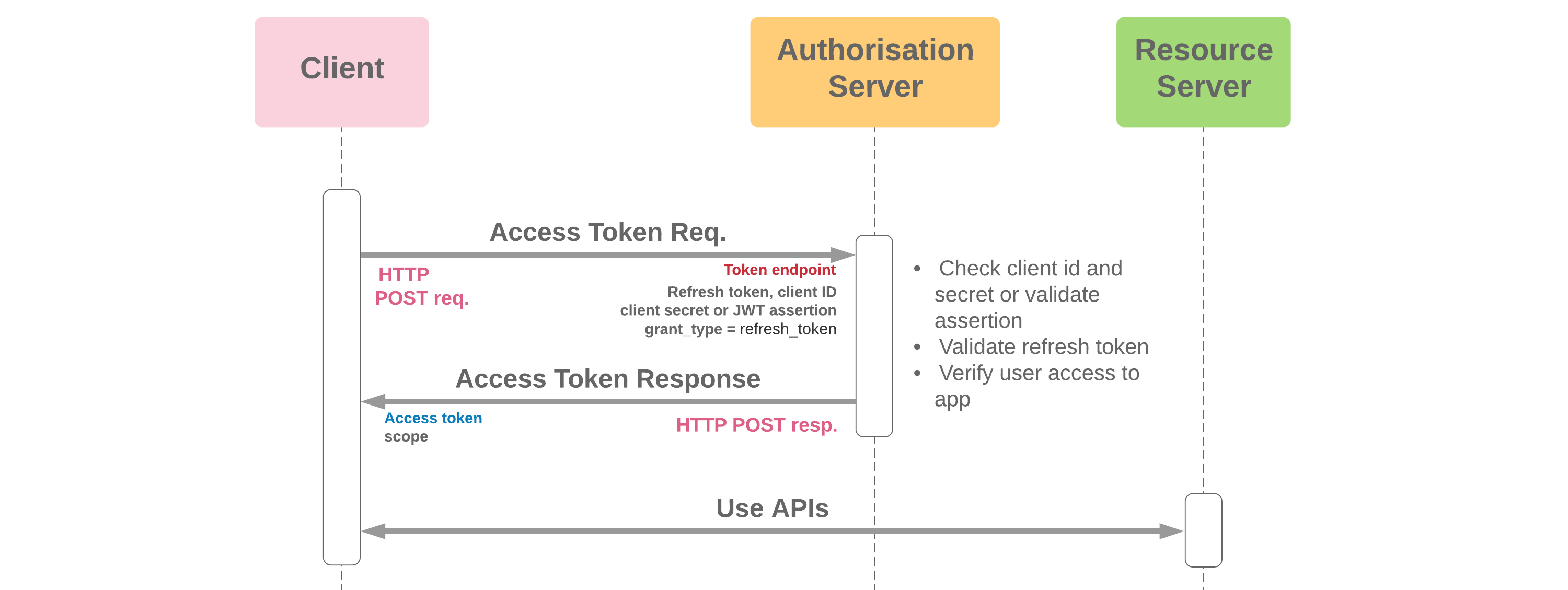
This section covers the OAuth 2.0 Refresh Token flow . Refresh Token flow can only be implemented for OAuth flows with user interaction like Web Server flow and User Agent Flow. Flows like JWT and SAML Bearer don't provide a refresh token even if specified in the scope of the Connected App.
-
The application server launches an HTTP POST request to the Salesforce
Token Endpoint at
https://crmarcade-dev-ed.develop.my.salesforce.com/services/oauth2/tokenwith the following parameters:-
grant_type=refresh_token -
refresh_token=<returned_by_Salesforce> -
client_id=3MVG9PwZx9R6_Urdy2QSE9vUS0bGInIVgkA8QDhx.bo98bY9LJQKZbqO_lMTXB4.CK1MvTAXIca5Sca742cB2- should match the client ID in the Connected App -
client_secret=69B6478DECEE6FA8D6CB04DD37DD32051BB5D90199C03FC497D50F93422DE49A- should match the client secret in the Connected App
-
-
Salesforce validates the POST request. Successful validation results in a positive response
and failed validation in a negative response. The following parameters are validated:
- Authorization code
- Code verifier
- Client id
- Client secret
- Redirect uri - if it matches with the redirect_uri specified in the Connected App
-
After a successful validation, Salesforce returns a response to the HTTP POST message
containing the following values:
-
token_type=Bearer -
access_token=<returned_by_Salesforce>
-
-
The
access_tokenfrom the response is used to query the Salesforce APIs.
- The refresh token has the same value as user credentials and should be securely stored. Proper precautions should be taken so that malicious actors cannot access this refresh token from e.g. a database. In case a refresh token is compromised, you can always expire it manually from the Salesforce setup menu.
JWT Bearer Token Flow (OAuth 2.0)
Scope can't be specified, it's always determined in the following way: If admins pre-authorize (using profile / permission set), scope parameter is optional. If not specified, all scopes defined in the connected app are granted. If users can self-authorize, scope is not taken into account. You need to first use another flow (like User-Agent or Web-Server) to grant explicit authorization for the scopes you need. This flow needs to return a refresh token. The scope returned by the JWT flow is the combination of all previously granted scopes where a refresh token was returned.
-
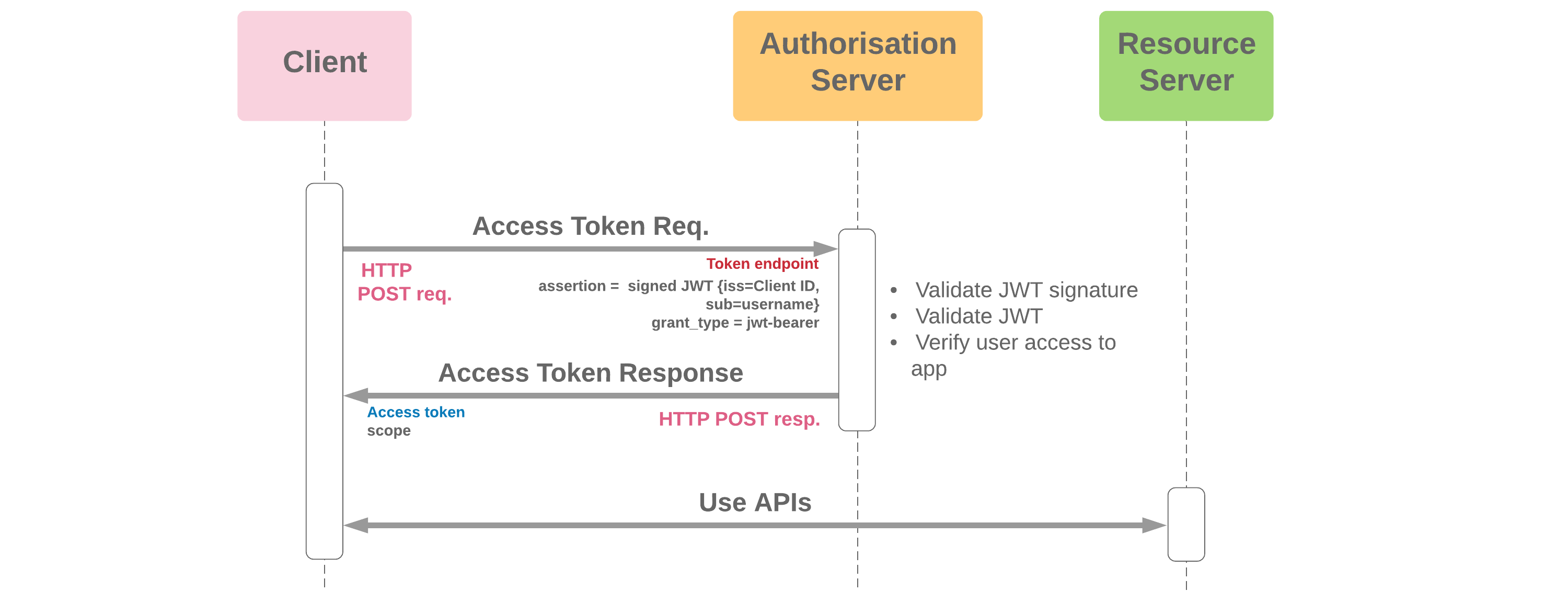
The application server launches an HTTP POST request to the Salesforce
Token Endpoint at
https://crmarcade-dev-ed.develop.my.salesforce.com/services/oauth2/tokenwith the following parameters:-
grant_type=urn:ietf:params:oauth:grant-type:jwt-bearer -
assertion=<generated_on_click>
-
-
Salesforce validates the POST request. Successful validation results in a positive response
and failed validation in a negative response. The following parameters are validated:
- Authorization code
- Code verifier
- Client id
- Client secret
- Redirect uri - if it matches with the redirect_uri specified in the Connected App
-
After a successful validation, Salesforce returns a response to the HTTP POST message
containing the following values:
-
token_type=Bearer -
access_token=<returned_by_Salesforce>
-
-
The
access_tokenfrom the response is used to query the Salesforce APIs.
-
A malicious app tries to access resources they are not allowed to. This is blocked by the
scope parameter of the Connected App. For example, even if the user has the permission to
post on chatter through its permissions, the malicious app will not be able to post on
chatter if the
chatter_apiscope wasn't enabled for the Connected App. - A malicious app tries to pretend to be the actual app. This is blocked by applying a signature as part of the assertion that is based on a private key only known by the actual app. The corresponding public certificate is uploaded in the connected app.
SAML Bearer Token Flow (OAuth 2.0)

-
The application server launches an HTTP POST request to the Salesforce
Token Endpoint at
https://crmarcade-dev-ed.develop.my.salesforce.com/services/oauth2/tokenwith the following parameters:-
grant_type=urn:ietf:params:oauth:grant-type:saml2-bearer -
assertion=<generated_on_click>
-
-
Salesforce validates the POST request. Successful validation results in a positive response
and failed validation in a negative response. The following parameters are validated:
- Authorization code
- Code verifier
- Client id
- Client secret
- Redirect uri - if it matches with the redirect_uri specified in the Connected App
-
After a successful validation, Salesforce returns a response to the HTTP POST message
containing the following values:
-
token_type=Bearer -
access_token=<returned_by_Salesforce>
-
-
The
access_tokenfrom the response is used to query the Salesforce APIs.
-
A malicious app tries to access resources they are not allowed to. This is blocked by the
scope parameter of the Connected App. For example, even if the user has the permission to
post on chatter through its permissions, the malicious app will not be able to post on
chatter if the
chatter_apiscope wasn't enabled for the Connected App. - A malicious app tries to pretend to be the actual app. This is blocked by applying a signature as part of the assertion that is based on a private key only known by the actual app. The corresponding public certificate is uploaded in the connected app.
SAML Assertion Flow (Single Sign-On)
Before starting this flow, make sure you go to https://axiomsso.herokuapp.com/RequestSamlResponse.action to generate a SAML response. Paste the plain-text version in a file at /data/authFlows.json

-
The application server launches an HTTP POST request to the Salesforce
Token Endpoint at
https://crmarcade-dev-ed.develop.my.salesforce.com/services/oauth2/tokenwith the following parameters:-
grant_type=assertion -
assertion_type=urn:oasis:names:tc:SAML:2.0:profiles:SSO:browser -
assertion=<generated_on_click>
-
-
Salesforce validates the POST request. Successful validation results in a positive response
and failed validation in a negative response. The following parameters are validated:
- Authorization code
- Code verifier
- Client id
- Client secret
- Redirect uri - if it matches with the redirect_uri specified in the Connected App
-
After a successful validation, Salesforce returns a response to the HTTP POST message
containing the following values:
-
token_type=Bearer -
access_token=<returned_by_Salesforce>
-
-
The
access_tokenfrom the response is used to query the Salesforce APIs.
Device Authentication Flow (OAuth 2.0)
-
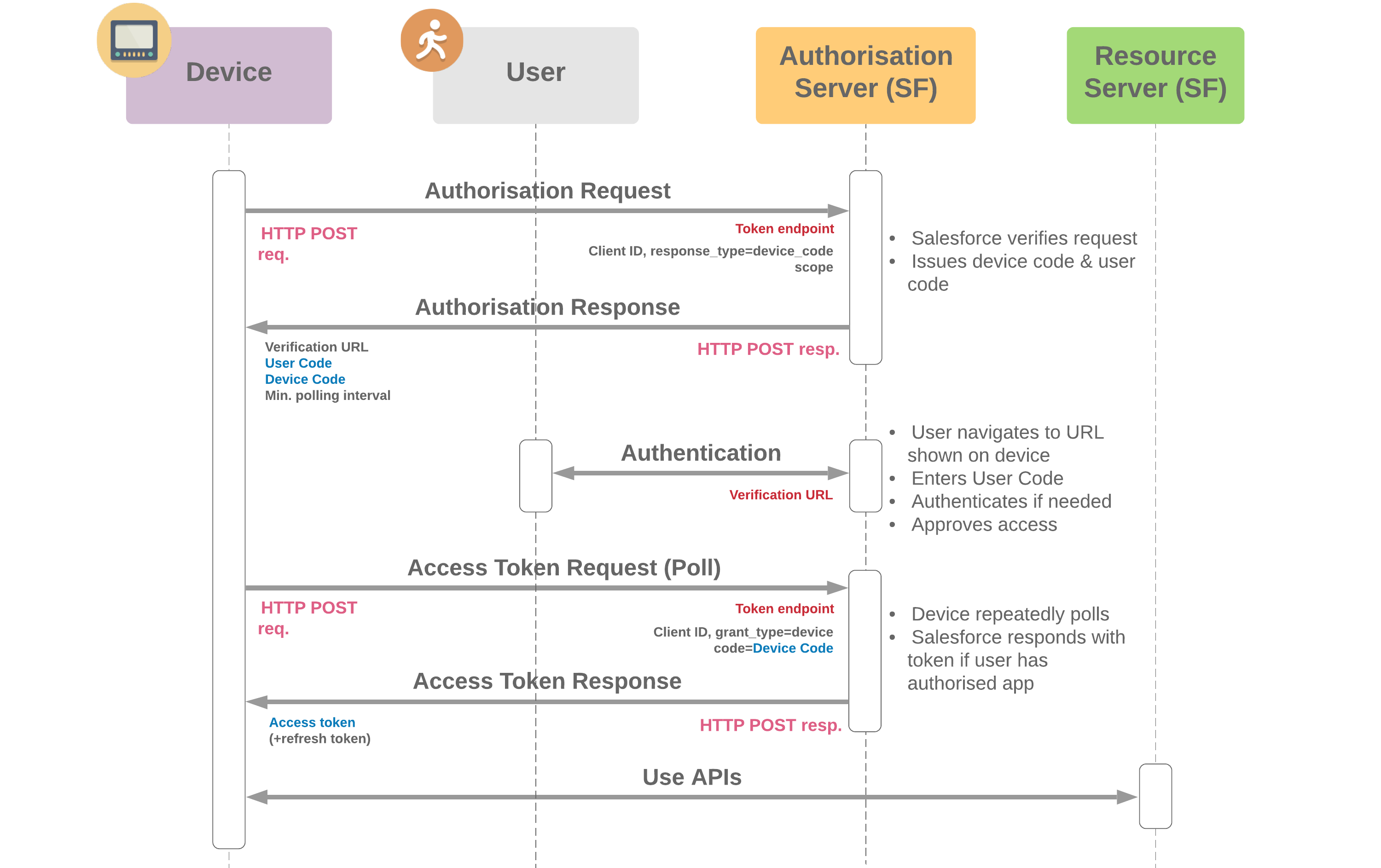
The application server launches an HTTP POST request to the Salesforce
Token Endpoint at
https://crmarcade-dev-ed.develop.my.salesforce.com/services/oauth2/tokenwith the following parameters:-
response_type=device_code -
client_id=3MVG9PwZx9R6_Urdy2QSE9vUS0bGInIVgkA8QDhx.bo98bY9LJQKZbqO_lMTXB4.CK1MvTAXIca5Sca742cB2- should match the client ID in the Connected App
-
-
Salesforce validates the POST request. Successful validation results in a positive response
and failed validation in a negative response. The following parameters are validated:
- Authorization code
- Code verifier
- Client id
- Client secret
- Redirect uri - if it matches with the redirect_uri specified in the Connected App
-
After a successful validation, Salesforce returns a response to the HTTP POST message
containing the following values:
-
The application server polls via HTTP POST requests the Salesforce
Token Endpoint at
https://crmarcade-dev-ed.develop.my.salesforce.com/services/oauth2/tokenwith the following parameters:-
grant_type=device -
client_id=3MVG9PwZx9R6_Urdy2QSE9vUS0bGInIVgkA8QDhx.bo98bY9LJQKZbqO_lMTXB4.CK1MvTAXIca5Sca742cB2- should match the client ID in the Connected App -
code=<returned_by_Salesforce>
-
-
Salesforce validates the POST request. Successful validation results in a positive response
and failed validation in a negative response. The following parameters are validated:
- Authorization code
- Code verifier
- Client id
- Client secret
- Redirect uri - if it matches with the redirect_uri specified in the Connected App
-
After a successful validation, Salesforce returns a response to the HTTP POST message
containing the following values:
-
token_type=Bearer -
instance_url=https://crmarcade-dev-ed.develop.my.salesforce.com -
access_token=<returned_by_Salesforce> -
refresh_token=<returned_by_Salesforce>
-
-
The
access_tokenfrom the response is used to query the Salesforce APIs.
Username-Password Flow (OAuth 2.0)
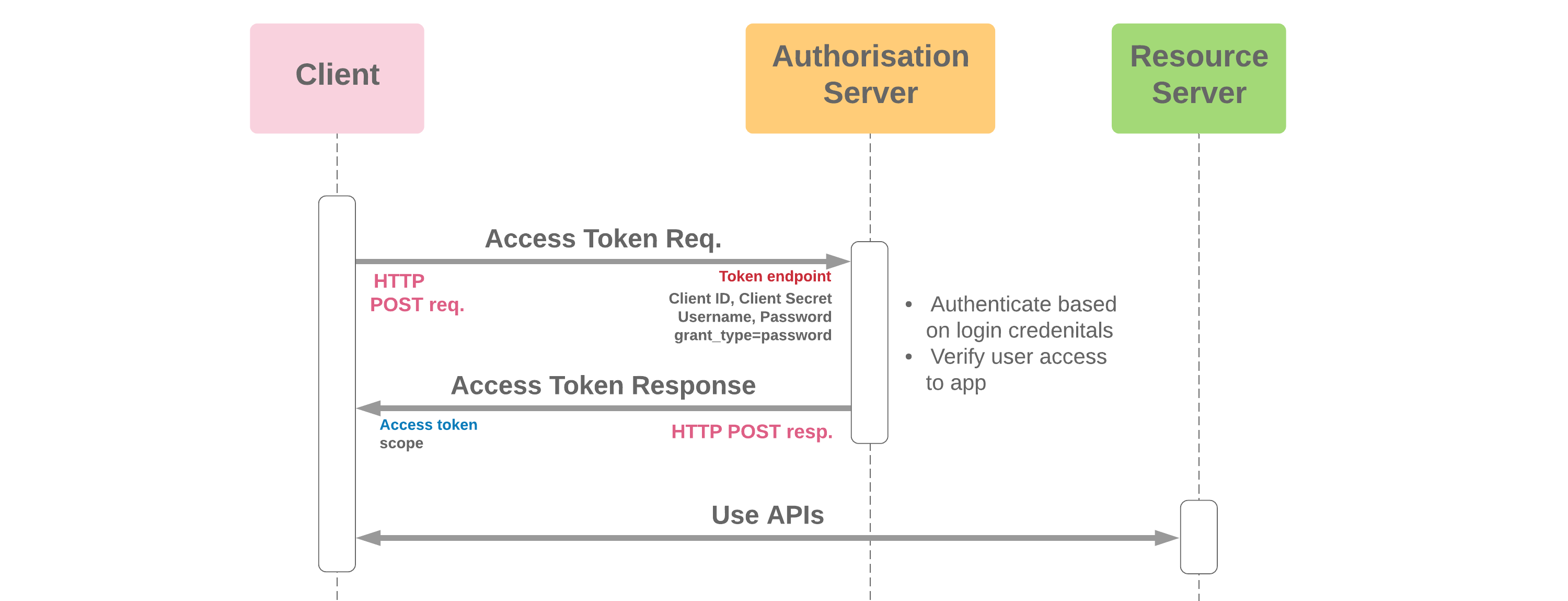
Enter username and password in the below form. Make sure to paste your security token after the password or to specify login IPs on your user profile. Attention: This is not secure! Don't use critical credentials, instead use a Trailhead Playground!
-
The application server launches an HTTP POST request to the Salesforce
Token Endpoint at
https://crmarcade-dev-ed.develop.my.salesforce.com/services/oauth2/tokenwith the following parameters:-
grant_type=password -
client_id=3MVG9PwZx9R6_Urdy2QSE9vUS0bGInIVgkA8QDhx.bo98bY9LJQKZbqO_lMTXB4.CK1MvTAXIca5Sca742cB2- should match the client ID in the Connected App -
client_secret=69B6478DECEE6FA8D6CB04DD37DD32051BB5D90199C03FC497D50F93422DE49A- should match the client secret in the Connected App -
username=<entered_by_user> -
password=<entered_by_user>
-
-
Salesforce validates the POST request. Successful validation results in a positive response
and failed validation in a negative response. The following parameters are validated:
- Authorization code
- Code verifier
- Client id
- Client secret
- Redirect uri - if it matches with the redirect_uri specified in the Connected App
-
After a successful validation, Salesforce returns a response to the HTTP POST message
containing the following values:
-
token_type=Bearer -
instance_url=https://crmarcade-dev-ed.develop.my.salesforce.com -
access_token=<returned_by_Salesforce>
-
-
The
access_tokenfrom the response is used to query the Salesforce APIs.
- A malicious actor monitors web traffic and can read username and password in plain text. This actor then abuses the credentials for malicious purposes.